
Dawn of War 4 System Requirements: Minimum and Recommended
Official Dawn of War 4 PC requirements: minimum and recommended CPU, GPU, RAM and 125GB storage, plus Windows 10 support, Steam Deck status and upgrade advice.
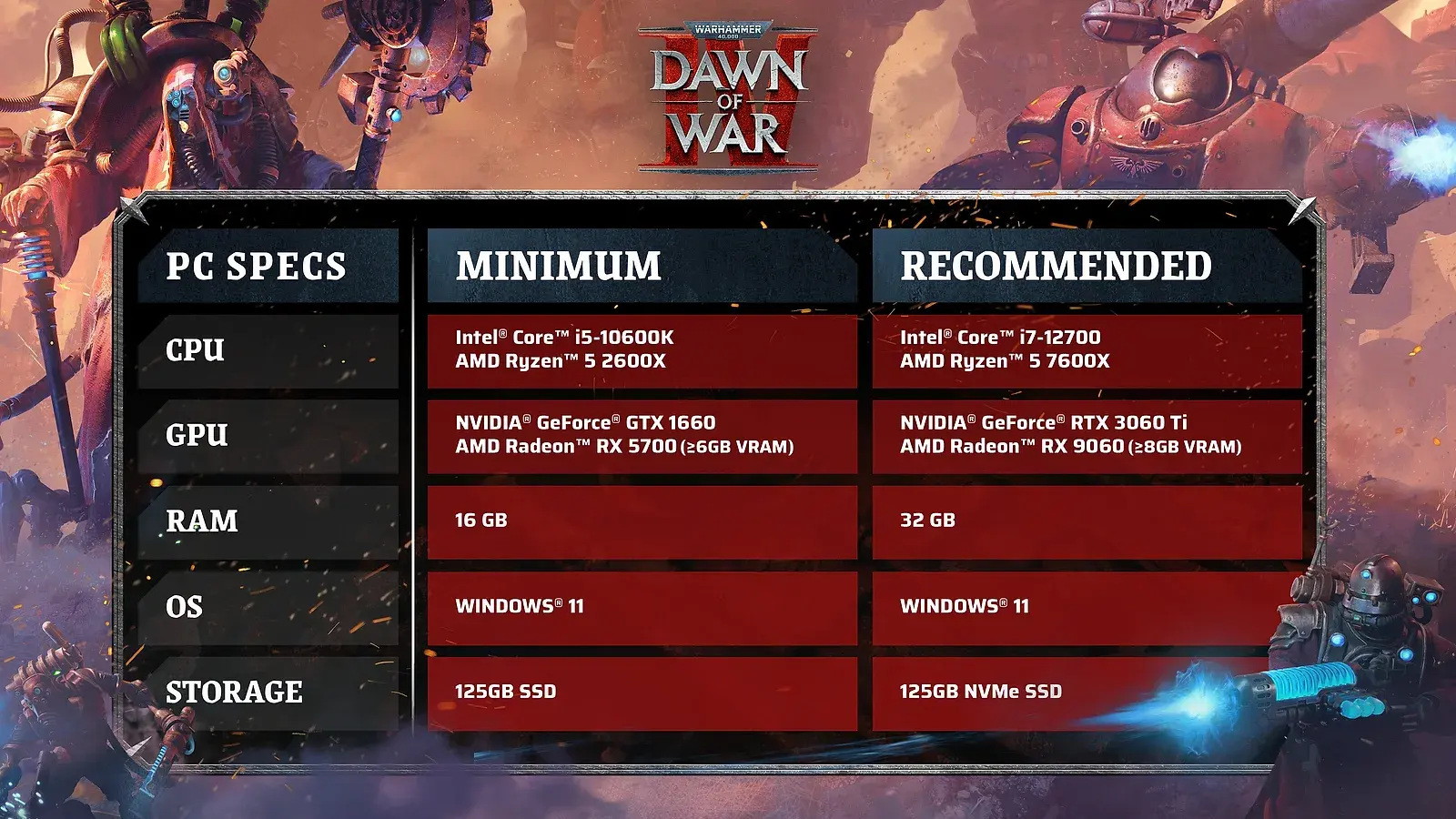
Quick answer: Dawn of War 4 requires Windows 11 64-bit, 16GB RAM and 125GB of storage at minimum, with an i5-10600K or Ryzen 5 2600X and a GTX 1660 or RX 5700. The recommended build is an i7-12700 or Ryzen 5 7600X, 32GB RAM and an RTX 3060 Ti or RX 9060 8GB.
The storage number is the first thing to plan for. 125GB is the official requirement, and the installed game is expected to be around 100GB, including roughly 25GB of cinematics. If your boot drive is already tight, install the game on a secondary SSD rather than deleting half your library at the last minute.
This page lists the official requirements, explains what they mean in practice and covers the edge cases: Windows 10, Linux, 24GB RAM and cloud gaming. For the release timing, see the Dawn of War 4 release date page→.
Official source: Warhammer 40,000: Dawn of War IV on Steam ↗ — official release date, factions, modes and system requirements.
Meeting the minimum does not guarantee smooth large battles. The Dawn of War 4 release date page→ covers what ships at launch.
Official Dawn of War 4 system requirements
| Component | Minimum | Recommended |
|---|---|---|
| OS | Windows 11 64-bit | Windows 11 64-bit |
| CPU | Intel Core i5-10600K / AMD Ryzen 5 2600X | Intel Core i7-12700 / AMD Ryzen 5 7600X |
| RAM | 16GB | 32GB |
| GPU | NVIDIA GTX 1660 / AMD RX 5700 | NVIDIA RTX 3060 Ti / AMD RX 9060 8GB |
| Storage | 125GB | 125GB |
| DirectX | Version 12 | Version 12 |
The minimum is not a "runs at 30 fps on low" promise; it is the configuration the developer supports. The recommended build is the safer target if you want the game to look good and hold a stable frame rate during large battles. RTS games are CPU-heavy, so the recommended CPU matters as much as the GPU.
The 125GB figure is unusually large for an RTS, and the cinematics are the reason. The campaign is a major part of the package, and the story sequences are delivered as high-quality video rather than in-engine cutscenes. If you skip the campaign entirely, you still install the files; there is no confirmed "multiplayer-only" install option.
What the CPU requirement means
Dawn of War 4 is an RTS with large unit counts and four factions with distinct economies. The CPU has to run pathfinding, AI, combat resolution and the strategic layer. That is why the minimum is a modern six-core Intel or a Ryzen 5, not an older quad-core.
The recommended i7-12700 or Ryzen 5 7600X is a meaningful jump. If you are building a new PC for the game, prioritize the CPU over the GPU at the minimum tier. A GPU that meets the minimum but a CPU that does not will produce stutter in large fights, which is worse than lower visual settings.
If you are upgrading an older system, the cheapest meaningful upgrade is usually the CPU platform, not the GPU. A modern six-core with 32GB of RAM will do more for an RTS than a flagship GPU paired with an old quad-core.
What the GPU requirement means
The GTX 1660 and RX 5700 are the minimum, and the RTX 3060 Ti or RX 9060 8GB are the recommended. Those are 1080p-class cards, which suggests the game is targeted at 1080p on the recommended build rather than 4K.
The GPU load comes from the campaign's cinematics, the unit detail and the effects layer in large battles. An RTS does not need ray tracing or the latest upscaling to look good, but it does need enough VRAM for the unit textures and enough fill rate for the effects. 8GB is the recommended VRAM tier; 6GB cards may run the game but will be closer to the minimum than the recommended experience.
If you have a card below the minimum, do not assume it will work because "RTS games are light." The 125GB install and the recommended 8GB VRAM suggest a modern renderer, not a lightweight one.
RAM: 16GB minimum, 32GB recommended
16GB is the minimum, but the game is expected to run on 24GB as well. The recommended 32GB is there for players who keep a browser, Discord and other applications open while playing. An RTS with a large campaign and a strategic layer benefits from headroom, especially if you stream or record.
The practical advice is:
- 16GB is enough to launch and play if you close background applications.
- 24GB is a comfortable middle ground for most players.
- 32GB is the safe target if you multitask, stream or plan to play Crusade Mode while watching guides.
RAM is cheap relative to a GPU upgrade, and it is the easiest component to add. If your motherboard has free slots, 32GB is a low-risk upgrade.
Windows 10, Linux and Steam Deck
The official requirement is Windows 11 64-bit. Windows 10 can run the game but is not supported, which means the developer will not guarantee stability or performance on it. If you are still on Windows 10, plan to upgrade before December 3 rather than troubleshooting on launch day.
Linux is not officially supported. A Linux beta build has been reported to run, but it is not a supported configuration and performance will vary. If you dual-boot, use Windows for the supported experience.
Steam Deck status is covered in the Dawn of War 4 Steam Deck page→. The short version is that the hardware requirements are above the Deck's comfort zone and there is no confirmed Verified rating at the time of writing.
Cloud gaming is the other option. GeForce NOW supports the game, so a supported region and a stable connection can substitute for local hardware. That is the best path for players who want to try the game before buying a new PC.
Storage and install planning
125GB is the headline number, but the real planning number is higher. You need space for the install, the download cache and the day-one patch. A 125GB requirement can easily become 150GB of used space during installation.
- Use an SSD. RTS load times and campaign cinematics benefit from fast storage.
- Keep 20–30GB free beyond the install size for patches and shader caches.
- Do not install on a nearly full drive. Windows slows down and updates can fail.
- Check your drive before launch. Deleting a game at the last minute is a worse experience than planning the space now.
If you have a 500GB SSD, Dawn of War 4 will take a quarter of it. If you have a 1TB drive, it is manageable but still worth clearing space in advance.
Will Dawn of War 4 run on your PC?
A quick checklist:
- OS: Windows 11 64-bit. If you are on Windows 10, upgrade.
- CPU: At least six modern cores; i5-10600K or Ryzen 5 2600X minimum.
- GPU: GTX 1660 or RX 5700 minimum; RTX 3060 Ti or RX 9060 recommended.
- RAM: 16GB minimum; 32GB recommended.
- Storage: 125GB free, SSD preferred.
- Internet: Required for the initial download and for multiplayer; campaign can be played offline after installation.
If you fail one minimum component, the game may still launch, but the developer will not support the configuration. The safest approach is to meet the minimum on every line, not to exceed it on one and fall short on another.
Meeting the minimum means the developer supports your configuration. It does not mean the game will hold a high frame rate in the largest battles. If smooth performance matters, target the recommended build.
FAQ
Can Dawn of War 4 run on Windows 10?
It can run, but Windows 10 is not officially supported. The official requirement is Windows 11 64-bit.
How much storage does Dawn of War 4 need?
125GB. The installed game is expected to be around 100GB, including roughly 25GB of cinematics, so plan for extra free space for patches.
Is 16GB RAM enough for Dawn of War 4?
16GB is the official minimum. 24GB works, and 32GB is recommended for multitasking, streaming or running the game with other applications open.
Will Dawn of War 4 run on a GTX 1660?
The GTX 1660 is the minimum GPU. It should run the game at the minimum settings, but the recommended RTX 3060 Ti or RX 9060 is the better target for a stable experience.
Sources
- Warhammer 40,000: Dawn of War IV on Steam ↗ — official system requirements.
- Dawn of War IV official site ↗ — platform and feature overview.
- Dawn of War IV Steam news hub ↗ — developer technical notes.